How to Choose a Budgeting App for Irregular Income
Key takeaways
- Mainstream budgeting apps break with irregular income because they anchor to predictable W2 paycheck dates and amounts.
- Score apps on forecast accuracy, tax estimation, invoice-timing awareness, buffer logic, scenario modeling, and data ownership.
- Budget fixed costs against your lowest month, variable categories against a 3-month average, and split the surplus between taxes and a buffer.
- Test an app by exporting 6-12 months of deposits and checking whether it handles late payments and reserves taxes per deposit.
- A spreadsheet is better if you have fewer than three income sources, a simple Schedule C, and want to avoid sharing bank credentials.
The right budgeting app for irregular income is the one that handles variable deposits well, not the one with the longest feature list. This article gives you a weighted six-criterion rubric, applies it honestly to Pyne (including where it falls short), and lets you score any candidate yourself in about 15 minutes.
Why do most budgeting apps break when your income changes month to month?
Mainstream budgeting apps are built around one assumption: money arrives on a known date, in a known amount. That paycheck anchor drives everything, from "safe to spend" calculations to monthly category targets. When your deposits come from 3-8 clients on net-30 and net-60 terms, that anchor is gone, and the app's core math stops matching your reality.
The paycheck anchor problem
Most consumer budgeting apps are designed for W2 earners, so they treat every month as a fresh start with predictable inflows. Freelancers report the same failure mode over and over: the tool assumes a paycheck and falls apart the moment 1040-ES deadlines enter the picture. Quarterly estimated taxes on Schedule C income are money you owe that was never withheld from a paycheck, and a paycheck-first app has no model for it.
What breaks first: budgets, categories, or forecasts
Budgets break first. A category target set against your average month fails in a lean month. Categories break next, because a single deposit mixes client revenue, platform fees, and reimbursements. Forecasts break last and hardest, since the app cannot answer "if client A pays late, can I cover rent?" That timing question, not the annual total, is what costs you. A two or three week gap on $5k-15k of monthly revenue can easily mean a few hundred dollars in late fees and missed interest. Revenue is not income, and no app anchored to paychecks makes that distinction for you.
What features actually matter for budgeting irregular income?
Six capabilities separate freelancer-grade tools from paycheck-grade ones. Score every candidate on these.
Income smoothing and baseline detection
The app should compute your baseline from actual deposits, not ask you to type an average. A tool that detects your low month automatically can tell you what "safe to spend" really means this week.
Buffer-based budgeting instead of monthly budgets
Monthly envelopes assume income arrives on the 1st. With net-30 and net-60 clients, you need budgeting keyed to a cash buffer and runway, not calendar months.
Variable-category handling and tax set-asides
Self-employment tax, 1040-ES deadlines, and platform fees need their own treatment. A paycheck app lumps these into "miscellaneous," which is how freelancers end up short in April. We cover the mechanics in our guide to self-employment tax on freelance income.
Timing-aware cash flow forecasting
The forecast must model invoice dates and payment lags, not just categories. If it can't answer "if client A pays late, can I cover rent?", it's a spreadsheet with a nicer skin. Here is how to build a 90-day cash flow forecast by hand if you want to see what the app should be doing.
How do zero-based, envelope, and cash-flow forecasting methods compare for variable earners?
Zero-based budgeting assigns every dollar of last month's income a job. That works when the dollars arrive on schedule. With net-30 clients, it means re-planning your entire month every time a payment slips.
Envelope (or buffer-based) budgeting holds one month of expenses in cash and budgets from the buffer, not from new deposits. It absorbs lumpy income well, but it parks money in checking that could earn in a high-yield account, and it does nothing to predict next month.
Cash-flow forecasting projects future balances from expected invoice dates and recurring bills. It is the only method that answers the question freelancers actually ask: "if client A pays late, can I cover rent?" The tradeoff is accuracy. A forecast is only as good as your invoice-date assumptions.
| Method | Fits lumpy income? | Main gap |
|---|---|---|
| Zero-based | Rebuilt every deposit | Assumes income already arrived |
| Envelope / buffer | Yes, via buffer | Idle cash, no forward view |
| Cash-flow forecast | Yes, via projections | Wrong invoice dates mean a wrong forecast |
Most consumer apps are built around paycheck-style budgeting rather than invoice-date forecasting, so verify the method before signing up. Pyne is forecast-first. Its tax set-aside and forecasting features by plan are listed on the pricing page.
Should you budget on your average income, your lowest month, or last month's deposit?
Worked example: three baselines on the same 12 months
Say your last 12 months of deposits run $5k to $15k, averaging $9k. Budgeting on the average means three or four lean months where you overspend by $2k-4k and raid your tax set-aside. Budgeting on your lowest month ($5k) is safe but leaves $3k-4k idle every strong month instead of earning in a high-yield account. Last month's deposit is the worst baseline: it turns one slow client into a spending spiral.
The hybrid that works
Fixed costs against your lowest month. Variable categories against a trailing 3-month average. Anything above that split between your tax set-aside and a buffer. That buffer is what carries you between net-30 and net-60 payments. Shortening those terms helps too: see our guide to getting paid faster with better payment terms.
Which evaluation criteria matter more than price for freelancers?
The 6-criterion rubric with weights
Price is the wrong first filter. A free app that lets you miss a 1040-ES payment costs more than a paid one that doesn't. Score candidates instead on:
| Criterion | Weight |
|---|---|
| Forecast accuracy | 25% |
| Tax estimation | 20% |
| Invoice-timing awareness | 20% |
| Buffer logic | 15% |
| Scenario modeling | 10% |
| Data ownership | 10% |
The weights reflect what actually causes overdrafts and penalty risk: wrong deposit timing and wrong tax set-asides.
Run every candidate through the same six scores, including the one this site sells, below. If a tool cannot produce a number for a criterion during the trial, score that criterion a zero rather than digging through documentation. The point of weighting is that it forces a comparison you can defend later, when a lean month arrives and the app's advice stops matching your bank balance. Write the scores down before the trial expires, because most vendors will not let you re-run the same data without paying.
Questions to ask Fincaster, Freelancer Finance Forecast, Finlingo, Dzing, and Copilot Money
Buffer logic deserves the longest look, because it is where generic budgeting apps quietly fail variable earners. A good buffer rule does two things at once: it holds enough cash to cover a client who pays on day 55 instead of day 30, and it moves the surplus into a high-yield account so idle money earns something. Over-holding is a real cost. With top high-yield savings accounts paying around 4% APY as of October 2026, letting $3,000 sit in a checking buffer for a year forgoes roughly $120.
An app that only ever says "keep more cash" solves half the problem. The goal is avoiding overdrafts without over-holding cash. When you evaluate Fincaster, Freelancer Finance Forecast, Finlingo, Dzing, or Copilot Money, ask each one a concrete question: can it tell you the minimum balance to hold while the rest earns yield? Then check whether the answer uses your actual invoice dates or a monthly average. If Fincaster is on your shortlist, we have a direct Pyne vs Fincaster comparison.
How does Pyne score on this rubric, honestly?
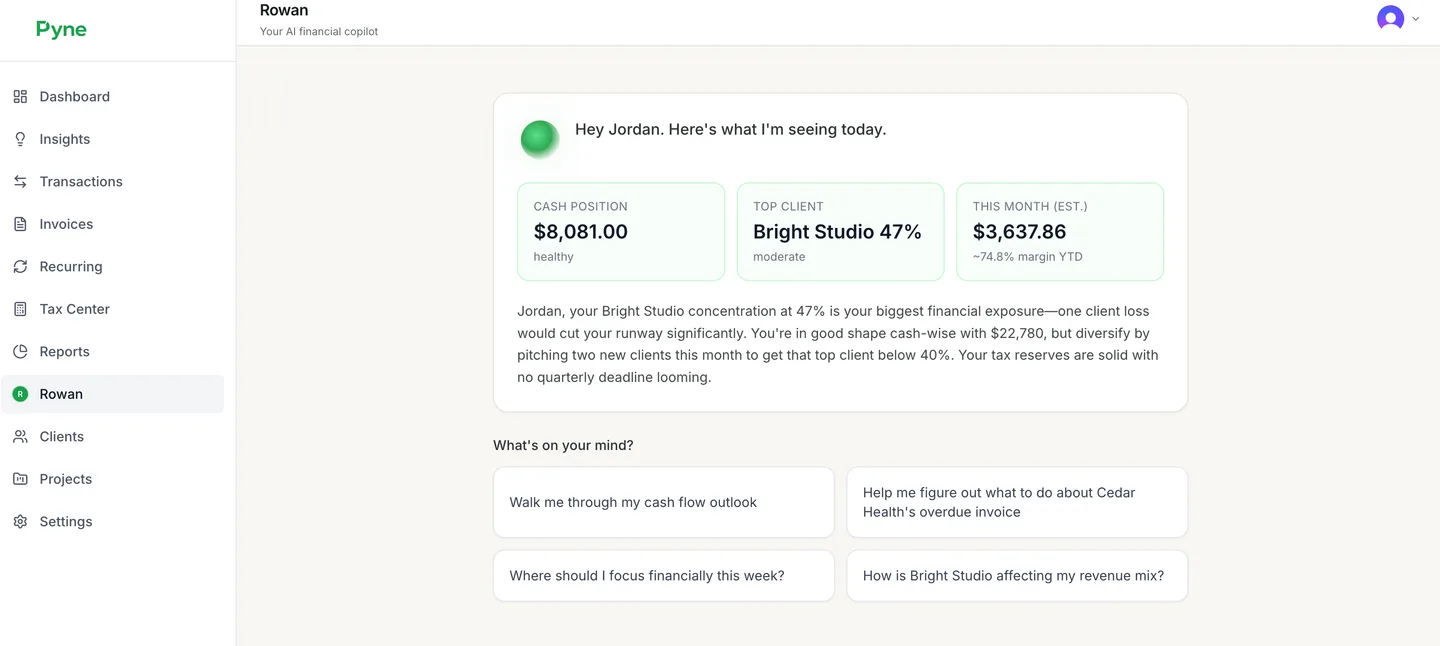
Pyne is built for this problem. It forecasts cash flow from your actual transactions, estimates quarterly taxes against your real deposit pattern, and answers "if client A pays late, can I cover rent?" from your data instead of generic advice. On variable deposits, buffer planning, and forecast accuracy, it scores high because those are the core of the product, not add-ons.
Where Pyne falls short
It is not a full budgeting app. If you want envelope-style category spending limits or shared household budgets, Pyne will not replace that. It sits on top of your accounts as a forecasting and tax layer.
The forecast is only as good as the transaction data your banks expose, so mislabeled or missing feeds degrade it. For clients on net-60 terms, invoice-timing assumptions may need manual correction until Pyne has seen a few payment cycles from each payer.
The deepest features are on the top tier. Scenario modeling and the 12-month forecast are Pro+ only. The free plan gives you a 30-day forecast, which is enough to run the tests below but not enough to see a full quarter.
How do you test whether an app handles irregular income before committing your data?
The three-test protocol
Export 6-12 months of deposits from your bank as CSV, then run the app's trial against that file.
- Deposit variance test. Load the CSV or connect accounts and check whether the forecast bends around your actual lumpy months or quietly averages them away.
- Late-client scenario. Ask the tool (or build it manually) what happens if your largest net-60 client pays two weeks late. See whether it shows which bills clear and which bounce.
- Tax set-aside check. Enter your effective rate and confirm it reserves against deposits as they land, not as a monthly guess, and that the number roughly matches what you owe on Form 1040-ES.
Red flags in onboarding and pricing pages
Watch for onboarding that demands a fixed "monthly income" before showing any forecast, and pricing that bills per bank connection when your income lands across Upwork, a direct client, and a second bank. Pyne's pricing is tiered by feature depth rather than account count, but verify current tiers on the pricing page before committing.
When is a spreadsheet still the better choice?
Keep the spreadsheet if all three of these hold: you draw from fewer than three income sources, your tax situation is a single Schedule C with no entity complications, and you would rather not pipe bank credentials into another vendor. A single client on net-30 plus one platform payout is simple enough that a forecast is arithmetic, not a product.
A sheet also wins when your workflow is idiosyncratic, like modeling which bill gets paid from which expected invoice. No app matches a formula you wrote for your own income.
The honest tradeoff: you lose automated transaction import, recurring tax set-aside reminders, and scenario toggles. If manual entry costs you more than an hour a month, revisit an app.
FAQ
What is the best budgeting app for irregular income?
The best app scores highest on variable-deposit handling: income smoothing, buffer-based budgeting, tax set-asides, and invoice-date forecasting. Run every candidate, including Pyne, through a weighted rubric covering forecast accuracy, tax estimation, timing awareness, buffer logic, scenario modeling, and data ownership before committing your data.
How do I budget when my income changes every month?
Budget fixed costs against your lowest recent month, variable categories against a trailing 3-month average, and split anything above that between your tax set-aside and a cash buffer. Averaging across all 12 months fails in lean months, and last month's deposit alone turns one slow client into a spending spiral.
How much should I set aside for taxes as a freelancer with variable income?
Reserve against deposits as they land using your effective tax rate, rather than guessing a monthly figure. Quarterly estimated payments on Form 1040-ES are due on a fixed calendar even though your income is not, so the set-aside should flex with each deposit and be checked against what you actually owe.
Can a budgeting app predict cash flow when clients pay late?
Only if it forecasts from invoice dates and payment lags rather than monthly averages. Ask the tool what happens if your largest net-60 client pays two weeks late: a real forecast shows which bills clear and which bounce. Apps anchored to paycheck dates cannot answer that timing question.
Is YNAB or a forecasting app better for freelancers?
YNAB uses zero-based budgeting, which works well once income has arrived but means re-planning each time a net-30 payment slips. A forecasting app projects future balances from expected invoice dates, which directly answers whether a late payment breaks your month. Pair a forecaster with a budgeting tool if you want envelope limits.
See what's coming with your money →
Pyne provides estimates and general financial insights for informational purposes only. This is not tax, legal, or financial advice.